
Online│Stock Availability and Back-in-stock
Table of Contents
• Check stock availability
• Restock notifications
To check availability, select a color and size on the product page. Stock status will be displayed before you add the item to your cart.
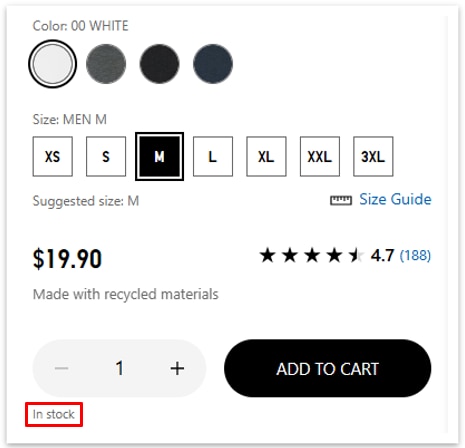
Stock Status Guide
In stock: Available to order
Out of stock: Currently unavailable for purchase
*Restock timing is not confirmed. Some items may offer restock notifications.
Low stock remaining: 10 or fewer items left
*Availability may change before checkout is completed.
For select out‑of‑stock items, you can sign up to receive a notification when the item becomes available again. Notifications are sent by email or app push.
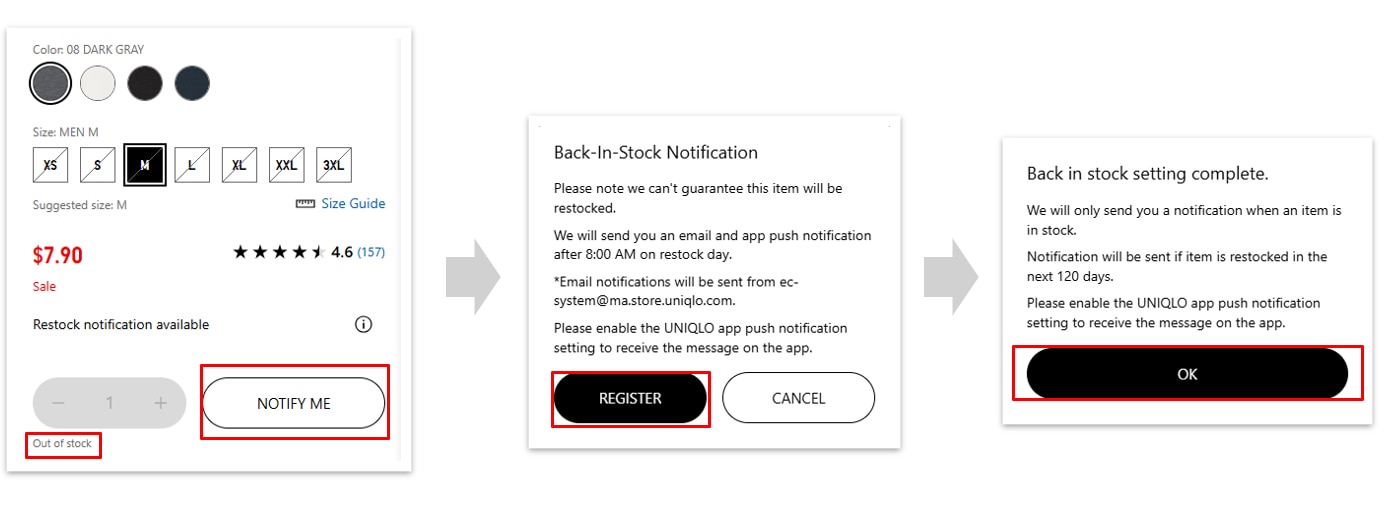 *Signing up does not guarantee availability or purchase.
-
I haven’t received a restock notification. When will the item be restocked?
Restock dates are not confirmed in advance. Notifications are only sent if the item is restocked. If an item is discontinued, a notification will not be sent.
-
I received a notification, but the item is already out of stock.
Popular items may sell out quickly once they are restocked. We recommend checking availability as soon as you receive the notification.
-
Can I change or cancel my restock notification?
Once registered, restock notifications cannot be changed or canceled. If needed, you may register again.
 BY CHAT