
Store│Stock Availability
For more details about online store inventory, you can visit the link below:
How to check online store inventory
Table of Contents
• How to check store inventory
• Important notes
How to Check Store Inventory
- Select the color and size on the product page in the online store.
- Tap “Select a store” or “Nearby stores with stock”.
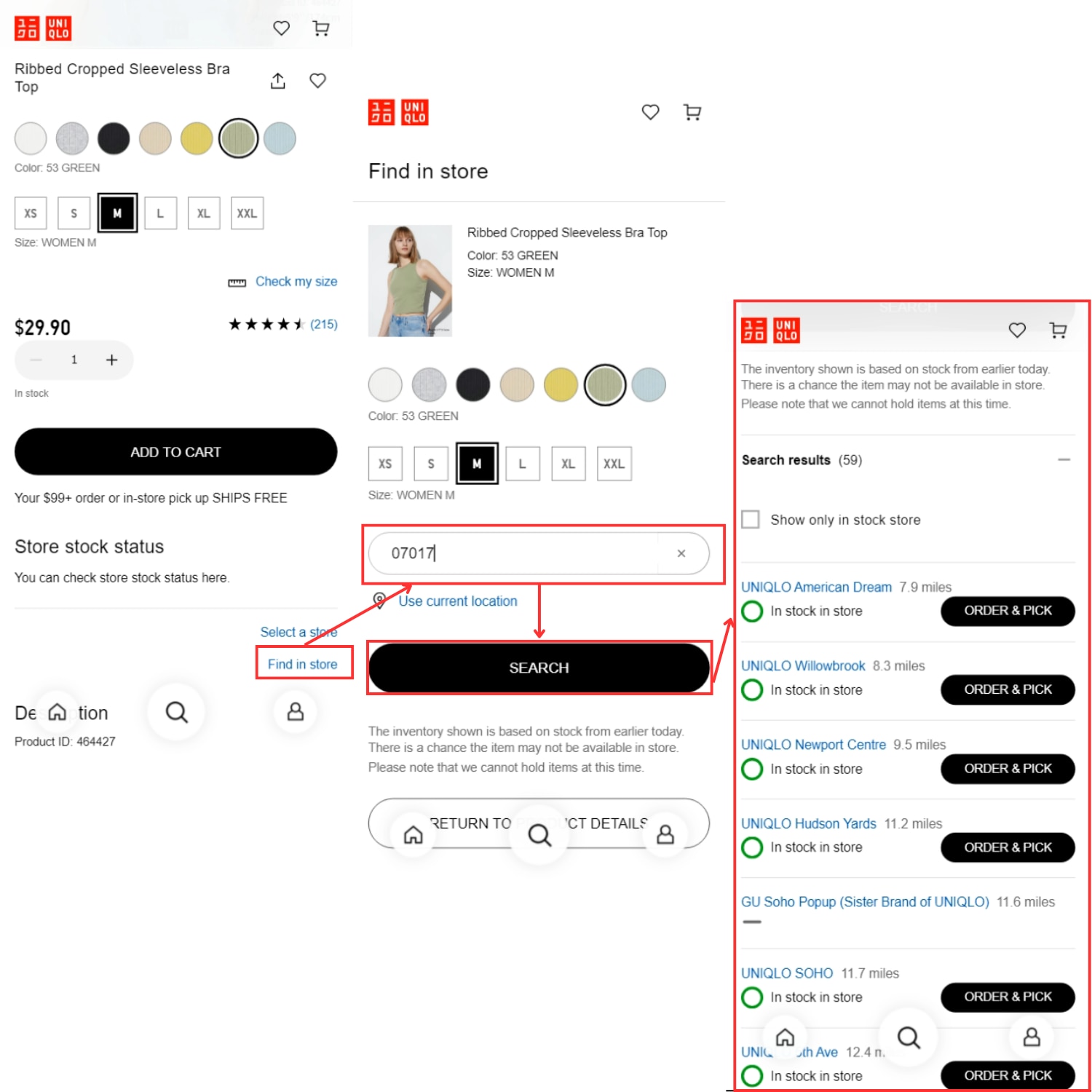
- Enter a store name or location in the search field to find available inventory.
*If location services are enabled, nearby stores will be shown automatically.
*You can also filter results by selecting “Show only stores with stock.” - Review the availability results shown for each store.
| Search Result | Stock Estimate |
|---|---|
| In stock | 4 or more items |
| Only a few left | 2–3 items |
| Out of stock | Not available |
*Stock information may not reflect real‑time availability and can change quickly.
*Reservations and phone orders are not available.
Important Notes
- Online‑exclusive promotions and pre‑order items may not be available in stores.
- Inventory search may not be available for some products.
*If this article did not address your concerns, please ask our ChatBot.
 BY CHAT